Written by: Luis Teran, Co-founder, CEO, TenantEvaluation | Last updated: August 6, 2026
Key Takeaways for Florida CAMs and Boards
- Identity fraud affects 93.3% of multifamily operators, so biometric verification now plays a central role in protecting Florida condo and HOA communities.
- The four-step biometric process uses government ID validation, AI liveness detection, facial landmark mapping, and selfie-to-ID comparison to confirm identity.
- IDVerify places biometric verification directly inside TenantEvaluation’s FCRA-compliant screening workflow, which removes external portals and extra steps for managers and applicants.
- Biometric results, including liveness status and redacted ID copies, appear in the same screening report used for background checks and income verification, creating audit-ready documentation.
- Protect your community from identity fraud with TenantEvaluation’s biometric-backed screening — learn more today.
The Problem: Identity Fraud Risk for Florida CAMs
Identity fraud in rental and HOA applications is a daily operational risk, not a hypothetical scenario. A 2024 NMHC/NAA Pulse Survey of 75 multifamily owners, developers, and managers found that 93.3% experienced rental application fraud in the past 12 months, including 84.3% who encountered income documentation fraud and 70% who encountered fraudulent identity information. One in four eviction filings traces back to a fraudulent application.
For Florida CAMs managing high-density condos and HOAs, this exposure becomes direct liability. When a fraudulent occupant enters a community through a document-only screening process, the board and management company absorb the operational and legal consequences. Traditional document-based review, which relies on uploaded ID images and manual inspection, cannot confirm that the person submitting the application matches the person pictured on the document. Biometric verification closes that gap by tying the live applicant to the government ID.
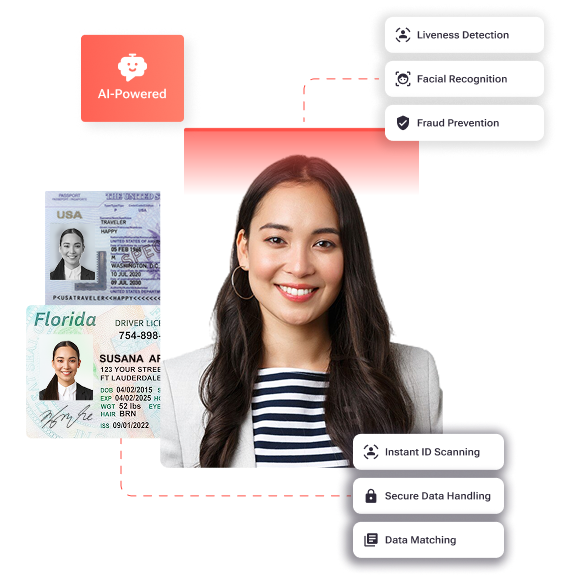
Step 1: Validating Government-Issued IDs Inside TenantEvaluation
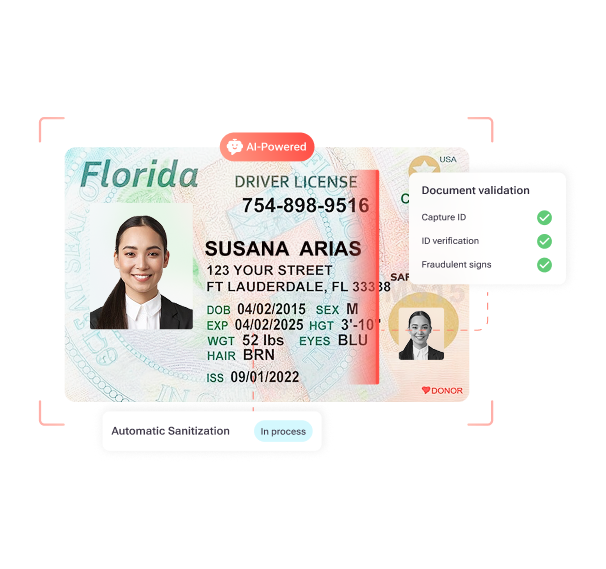
In IDVerify, applicants upload their government-issued ID directly inside the TenantEvaluation application workflow. The system performs automated authenticity validation, examining layout, fonts, holograms, security features, barcodes, and front-and-back consistency to detect alterations or forgeries. This stage checks ID authenticity and validity, extracts PII fields via OCR, barcode, and MRZ, and confirms that the document has not expired.
CAMs see the ID authenticity confirmation result and a redacted ID copy embedded directly in the screening report. This approach removes manual document review and limits exposure of sensitive data to what FCRA permissible-purpose controls allow.
Step 2: Using AI Liveness Detection to Confirm a Real Person
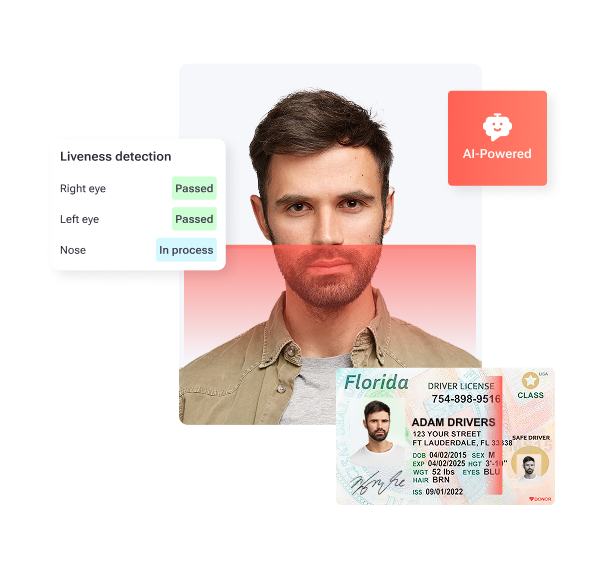
After ID upload, applicants in IDVerify complete a guided selfie verification step. The AI-powered liveness engine confirms physical presence in real time. Liveness detection confirms that the selfie comes from a live person rather than a photo, video, screen, or mask, and it detects injection attacks that feed pre-recorded or manipulated images.
The liveness verification status appears as a clear result inside the screening report visible to the CAM. Boards reviewing applications through TenantEvaluation’s dashboard see whether liveness was confirmed before they make any approval decision.
Step 3: Matching the Selfie to the ID with Facial Biometrics
IDVerify performs facial landmark biometric mapping that analyzes the geometric structure of the applicant’s face, then runs a 1:1 selfie-to-ID comparison. This process confirms that the person matches the ID photo at the Plus and Premier verification tiers. The biometric match result appears in the screening report, which gives CAMs and boards a documented, audit-ready confirmation that the applicant’s physical identity matches the submitted government ID.
Step 4: Consolidating Biometric Results in the Screening Report
In IDVerify, all four verification outputs are consolidated into the TenantEvaluation screening report:
- ID authenticity confirmation
- Liveness verification status
- Biometric match result
- Redacted ID copy for compliance documentation
No external portal is required, which means CAMs access results inside the same workflow they already use for background checks, income verification, and document collection. This unified approach ensures boards see a clear, summarized verification status in their approval dashboard without switching between systems. Because every result is timestamped and audit-ready, compliance documentation happens automatically.
See IDVerify in your workflow and schedule a demo to watch biometric verification results appear directly in your screening reports.
Handling Applicants Who Decline Biometric Verification
Applicant refusal represents a defined scenario in any biometric verification program. Florida has no dedicated biometric privacy statute, and biometric data in Florida is covered only under the state’s data-breach notification rules, with no consent, retention schedule, or private right of action requirements for collection during tenant screening. Best practice for FCRA-aligned workflows still calls for applicant consent before biometric data is collected, which IDVerify manages through the standard consent screen in the TenantEvaluation application flow.
When an applicant declines biometric verification, CAMs typically choose one of several standard pathways:
- Proceed with document-only review and flag the application for enhanced manual scrutiny by the board
- Request an in-person identity confirmation at the management office with a government-issued ID
- Apply the community’s documented screening criteria consistently to all applicants who decline, in line with FCRA adverse action requirements
The critical compliance requirement is consistency. CAMs must apply the same alternative pathway to every applicant who declines biometrics to avoid fair housing liability. TenantEvaluation’s FCRA-first design supports documented, auditable handling of these scenarios.
How Liveness Detection Blocks Deepfakes and Spoofing
Liveness detection operates through several distinct mechanisms:
- Passive liveness detection identifies spoofing attempts by detecting screen artifacts, replay traces, unnatural texture, lighting inconsistencies, moiré patterns, unusual shadows, printed photos, paper masks, latex or silicone masks, and other signs of digital presentation or deepfakes.
- Active liveness detection requires users to perform randomized, specific actions such as head turns, smiling, or blinking, which bots, pre-recorded videos, and static images cannot replicate in real time.
- Injection attack detection monitors the integrity of the camera hardware and software feed during biometric verification to identify non-standard virtual cameras or system code modifications that indicate a man-in-the-middle attack.
For Florida HOA and condo boards, this layered liveness approach removes the fraud scenario where an applicant submits a stolen ID alongside a photo of the ID holder, which document-only review cannot detect.
Biometric Data Privacy and FCRA for Florida Associations
For Florida community associations, the FCRA provides the primary compliance framework. IDVerify strengthens permissible-purpose validation by confirming identity before screening authorization, which reinforces FCRA-aligned workflows and audit defensibility. Key privacy controls embedded in the TenantEvaluation workflow include:
- Written consent obtained from applicants before biometric data is collected, displayed as a mandatory consent screen in the application flow
- Automatic redaction of sensitive personal information from uploaded documents
- End-to-end encryption and PCI Level 1 compliance across all data handling
- Clear separation between decision-making by the association and data provision by TenantEvaluation, consistent with FCRA permissible-purpose controls
- Built-in audit trails for every application, timestamped and accessible for compliance review
Associations operating in states with stricter biometric laws, such as Illinois BIPA, which requires written informed consent before collection and disclosure of the specific purpose and length of term, should consult legal counsel on applicable obligations. TenantEvaluation’s consent-first workflow supports compliance readiness across jurisdictions.
Why Biometric Matching Outperforms ID Upload Alone
Document-based ID verification alone often fails to reduce identity-related failure rates because it lacks the biometric matching and SSN verification that occur during application-stage screening.
Document upload alone confirms that a valid ID was submitted. It does not confirm that the person submitting the application is the person on the ID. Biometric matching, specifically the 1:1 selfie-to-ID comparison combined with liveness detection, closes that gap. The highest-performing fraud gate remains at the application stage, where identity is verified with the full set of security signals, biometric confirmation and SSN validation, needed to detect manipulation or impersonation.
Document-Only vs. Biometric-Backed Screening: Side-by-Side View
| Verification Factor | Document-Only Review | Biometric-Backed (IDVerify) |
|---|---|---|
| Identity Fraud Exposure | 70% of operators who experienced fraud in the past 12 months reported identity theft, fraudulent ID documents, or use of another individual’s personal information. | Biometric integration blocked more than 5,400 fraudulent applications and $10M in potential bad debt in six months. |
| Verification Depth | Confirms that a valid ID was uploaded but cannot confirm that the submitter matches the ID. | Confirms ID authenticity, physical presence via liveness, and a 1:1 facial match to the ID photo. |
| Deepfake / Spoofing Defense | No defense, because document images can be manipulated or belong to a different person. | Liveness detection identifies screen artifacts, replay traces, masks, and deepfake indicators. |
| FCRA Audit Readiness | Manual document review produces inconsistent audit trails. | Timestamped, automated verification results appear in every application record. |
Boards then see these verification outcomes summarized in the TenantEvaluation report, along with a redacted ID copy and full audit trail, which supports consistent decisions and clean compliance documentation.
Request a live walkthrough of the IDVerify screening report for your community’s portfolio.
Frequently Asked Questions About IDVerify for Associations
How long is biometric data retained after an application is processed?
Florida has no dedicated biometric privacy statute, so the state does not set a specific retention period for biometric data collected during tenant screening. TenantEvaluation’s workflow follows consent-first data handling and FCRA permissible-purpose controls. Biometric data collected through IDVerify is used only for identity confirmation during the application process. Associations with applicants from states that have stricter biometric laws, such as Illinois, which requires destruction of biometric identifiers when the purpose for collection is fulfilled or within three years of the individual’s last interaction, should consult legal counsel on obligations for their applicant population.
Can boards view biometric verification results?
Boards can view biometric verification results in a summarized format. IDVerify results appear directly in the TenantEvaluation screening report, which board members access through the platform’s dedicated board review dashboard. Boards see the ID authenticity confirmation, liveness verification status, biometric match result, and a redacted ID copy in a single view alongside the rest of the applicant’s screening data. The system does not expose raw biometric data or unredacted ID images to board members, only the verification outcome and compliance documentation.
What happens if liveness detection fails for a legitimate applicant?
Liveness detection failures for legitimate applicants usually stem from environmental factors such as poor lighting, face obstructions like hats or sunglasses, camera quality issues, or an unstable internet connection during selfie capture. When liveness detection does not pass on the first attempt, the applicant receives guidance to retry under better conditions, including improved lighting, no obstructions, and a stable connection. If the issue continues, the application is flagged for manual review rather than automatically rejected, and CAMs can apply the community’s documented alternative verification pathway, such as in-person ID confirmation at the management office, consistently across all applicants who cannot complete biometric verification.
Is biometric verification FCRA compliant?
Biometric identity verification, when implemented correctly, aligns with FCRA requirements for tenant screening. The FCRA governs the use of consumer reports, including background checks and credit data, and requires permissible purpose, applicant consent, and adverse action procedures. IDVerify strengthens permissible-purpose validation by confirming identity before screening authorization, which supports FCRA-aligned workflows and audit defensibility. TenantEvaluation is built specifically for community associations with FCRA compliance as the foundation and operates as a direct reseller of TransUnion and Equifax data under strict bureau rules, with automated adverse action workflows and built-in audit trails for every application.
Conclusion: Upgrading from Document Review to Biometric-Backed Screening
Florida community associations that rely on document-only screening carry measurable fraud exposure that biometric verification directly addresses. The four-step process in IDVerify, government-issued ID validation, AI-powered liveness detection, facial landmark biometric mapping, and consolidated results in the screening report, moves communities from document-based review to biometric-backed identity confirmation without adding workflow complexity for CAMs or friction for applicants.
Every verification result is timestamped, audit-ready, and visible to boards inside the same TenantEvaluation platform used for background checks, income verification, document collection, and approval workflows. IDVerify is configurable per community and per portfolio, so associations can apply the right level of identity verification to match their risk profile.
Move to biometric-backed screening and schedule a demo to add IDVerify to your community’s workflow today.